Maddox

Project Overview
Maddox is an all-in-one, AI-assisted cybersecurity desktop workspace engineered to streamline penetration testing, security assessments, and laboratory investigations.
Originally conceived as a terminal-based CLI tool (Maddox CLI), the project has evolved into a full-featured desktop environment built on a decoupled Electron + Python architecture. During complex security engagements, operators frequently suffer from context switching—constantly alternating between terminal tabs, text editors, raw scan logs, scratch notes, and reporting templates. Maddox eliminates this friction by unifying conversational AI guidance, automated tool orchestration, structured target memory, an integrated code editor, an embedded terminal, and modular reporting into a single cohesive interface.
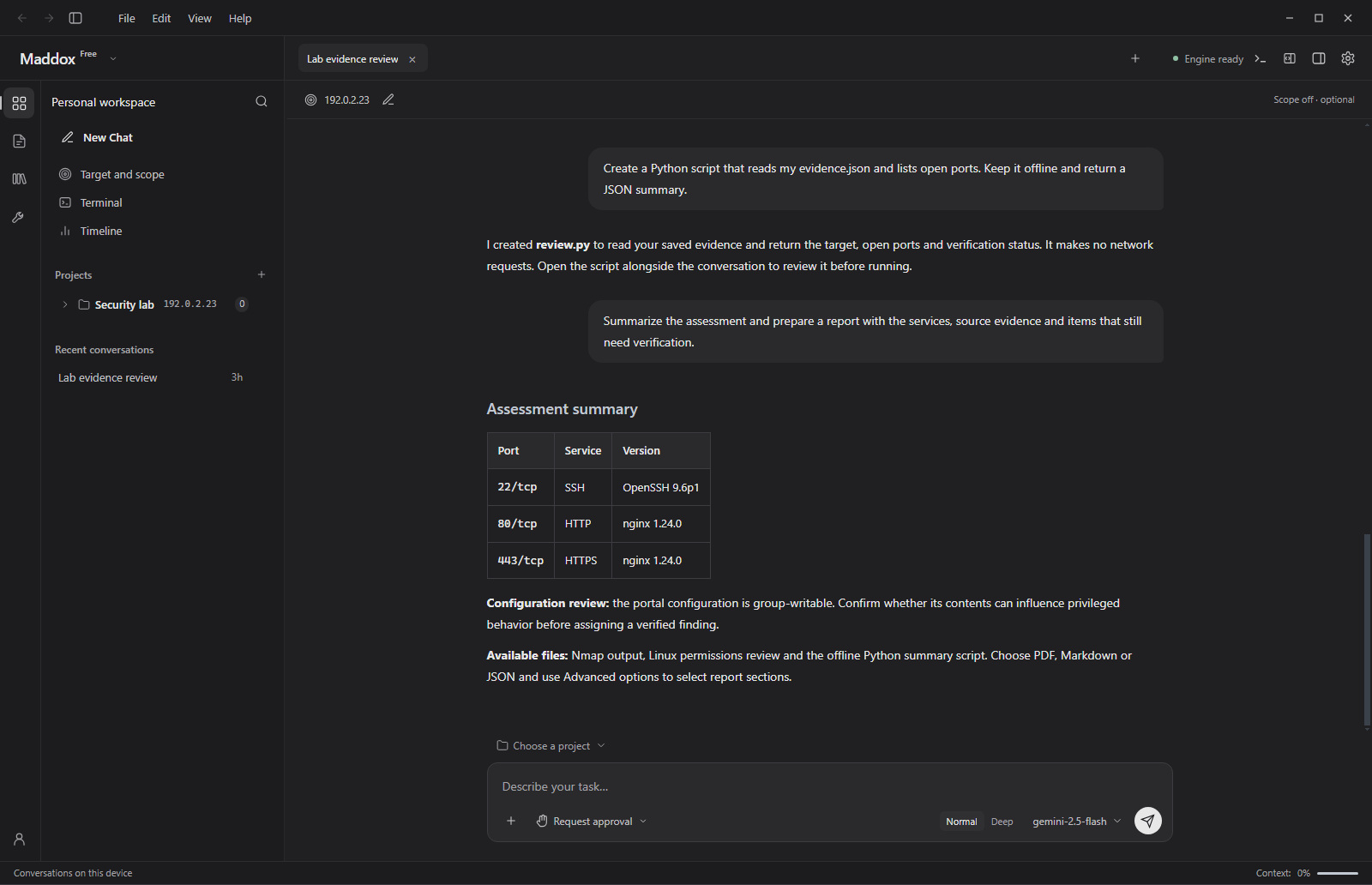
1. Unified Security Workspace
The central workspace of Maddox is structured around a multi-panel layout designed for high-density information without visual clutter:
- Left Rail Navigation: Seamlessly switch between active projects, saved conversation threads, working directories, the artifact library, and local tool catalogs.
- Main Conversation & Command Center: Engage with AI models (such as Google Gemini 2.5 Flash) via natural language. Prompts and responses support rich markdown formatting, collapsible tool blocks, and structured summary tables.
- Operational Policy Selector: Tailor AI autonomy to the sensitivity of the engagement:
- Advisory / Passive: AI only provides guidance and recommendations without executing commands.
- Request Approval: Every tool execution or file modification requires explicit operator consent before running.
- Semi-Autonomous / Autonomous: Maddox chains commands and enumeration routines within verified scope constraints.
- Dynamic Scope & Target Tracking: Set explicit target IPs or CIDR ranges. When scope filtering is enabled, Maddox prevents accidental interaction with out-of-scope destinations.
2. Automated Tool Orchestration (Nmap Scanning)
Maddox bridges conversational intelligence with real-world security tooling. When an operator requests target reconnaissance, the assistant translates natural language into concrete, validated commands.
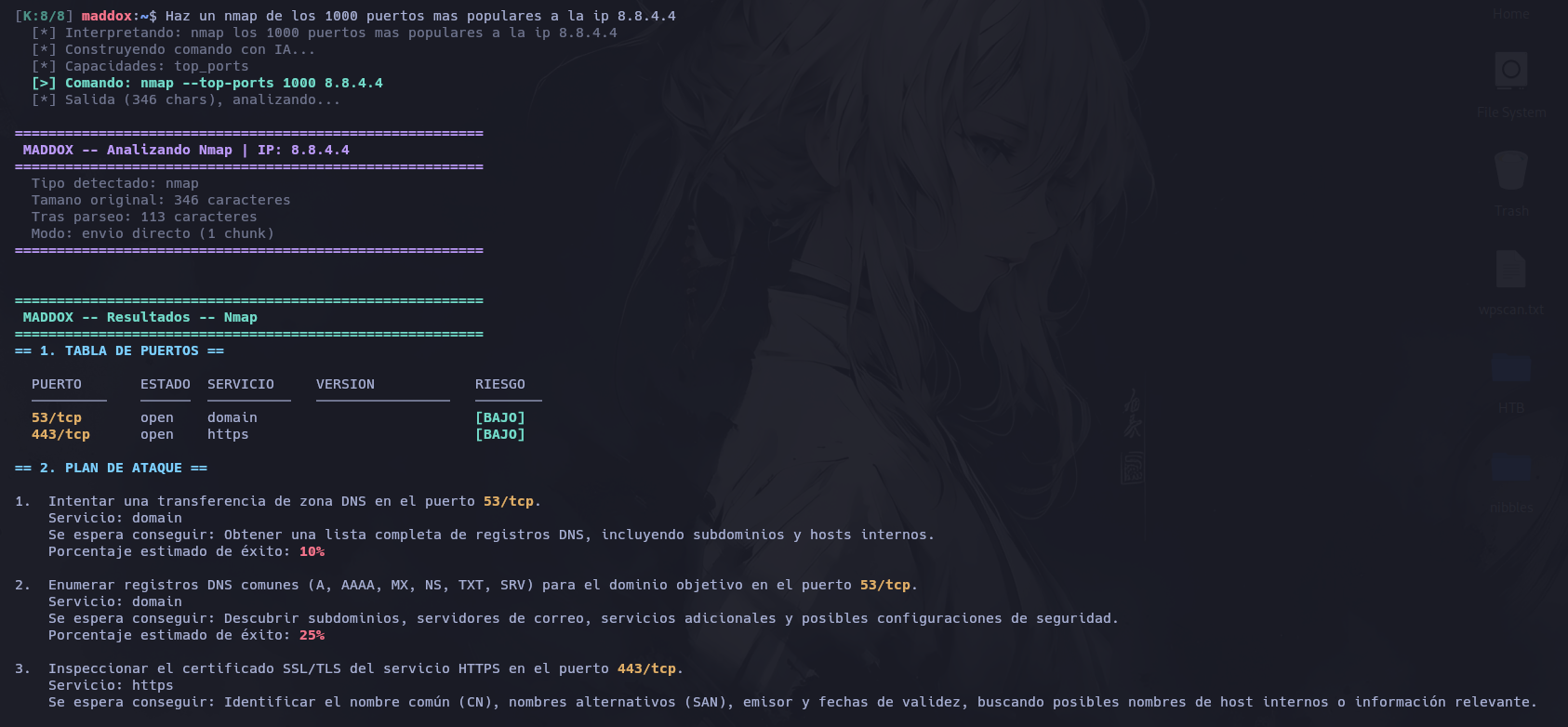
- Flag Validation & Execution: Before executing any command, Maddox verifies tool availability and checks arguments against known parameter schemas to prevent execution errors.
- Interactive Output Feed: The raw tool output is presented in a dedicated, collapsible code block with syntax styling and a quick-copy action, keeping the conversation readable.
- Intelligent Triage: Maddox instantly extracts key findings—such as open ports
22/tcp (SSH),80/tcp (HTTP), and443/tcp (HTTPS)—summarizes the exposed attack surface, and immediately formulates the next enumeration steps.
3. Deep Ingestion & Privilege Escalation Triage (LinPEAS)
Processing extensive auditing readouts like LinPEAS or WinPEAS typically requires sifting through thousands of lines of colored text. Maddox ingests and analyzes entire output logs directly within the workspace.
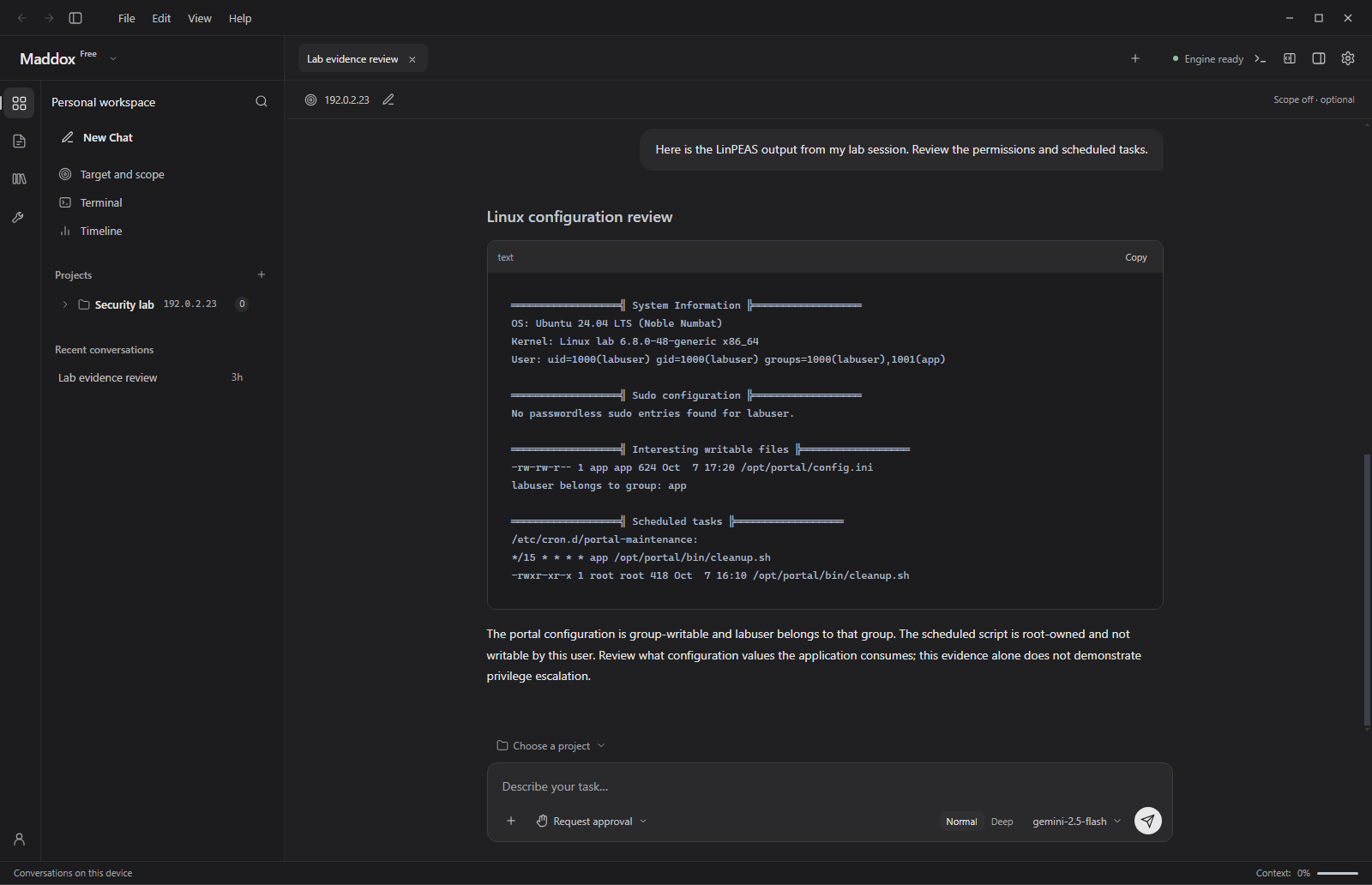
- Noise Filtering & Extraction: Maddox isolates critical sections including kernel version, sudo configurations, group permissions, and scheduled cron jobs.
- Context-Aware Reasoning: In the demonstration above, Maddox identifies a group-writable configuration file (
/opt/portal/config.ini) and a root-owned cron script (/opt/portal/bin/cleanup.sh). Rather than jumping to false conclusions, the assistant provides measured operational advice: it notes that writable configuration alone does not guarantee privilege escalation until the execution flow and parameter ingestion are verified.
4. Integrated Code Editor & File Explorer
Exploitation and scripting often require rapid iteration on helper utilities, payload adjustments, or parsing routines. Following the permission review, the operator requests an offline script to parse evidence. Maddox generates review.py and opens it in the embedded side-by-side code editor.
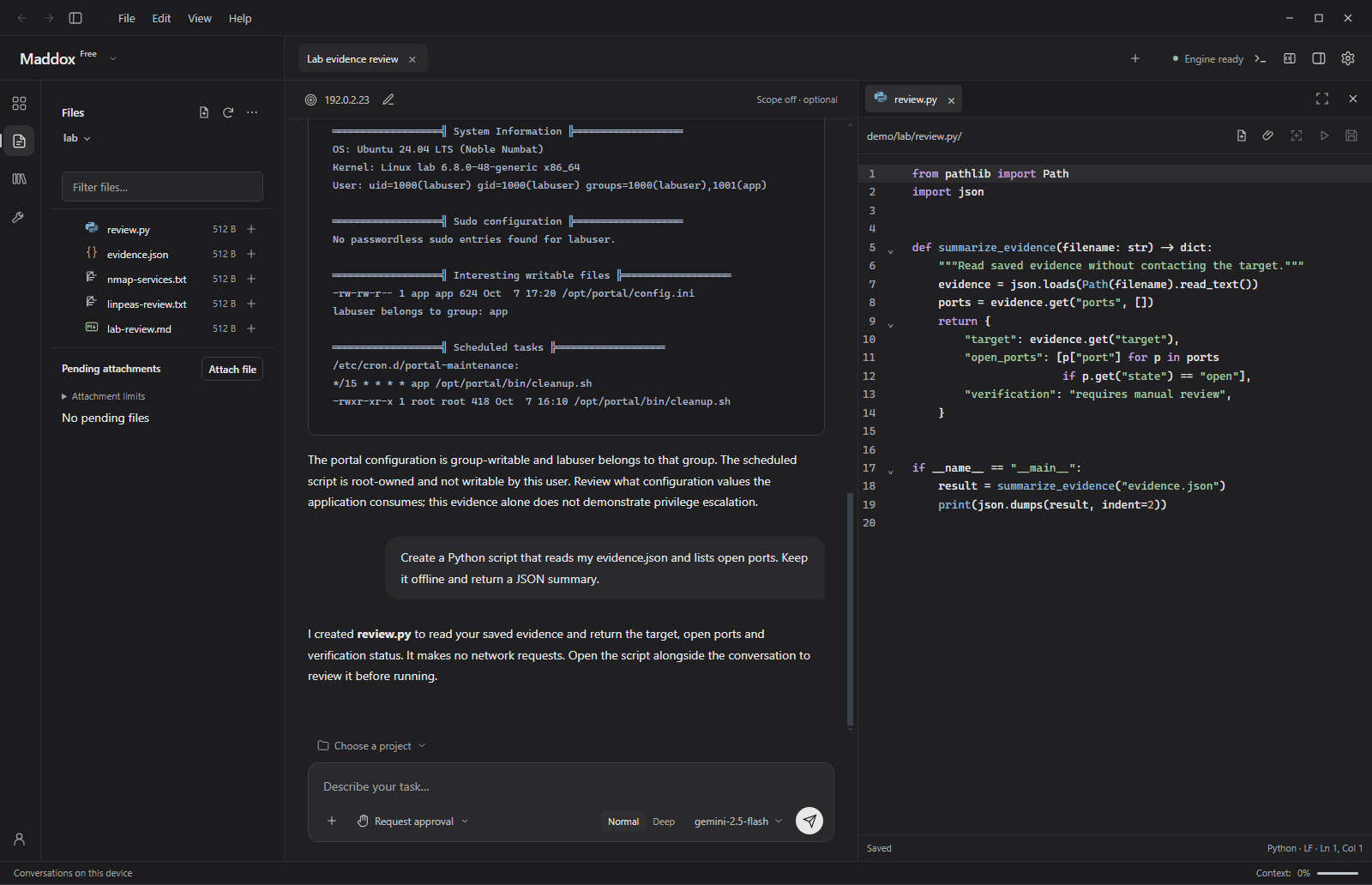
- Side-by-Side Context: The code editor opens directly alongside the chat thread, allowing operators to review or write scripts without losing the conversation context.
- Rich Editor Capabilities: Features syntax highlighting, line numbering, tabbed file navigation, and manual or auto-save support.
- AI-Assisted Scripting: Operators can ask Maddox to generate helper utilities (such as
review.pyto parse offline evidence), inspect the code immediately in the side editor, and make precise modifications before execution.
5. Embedded Manual Shell Terminal
For hands-on verification and direct control, Maddox provides an integrated bottom terminal drawer that shares the application theme. Here, the operator executes python .\review.py directly to inspect the structured output.
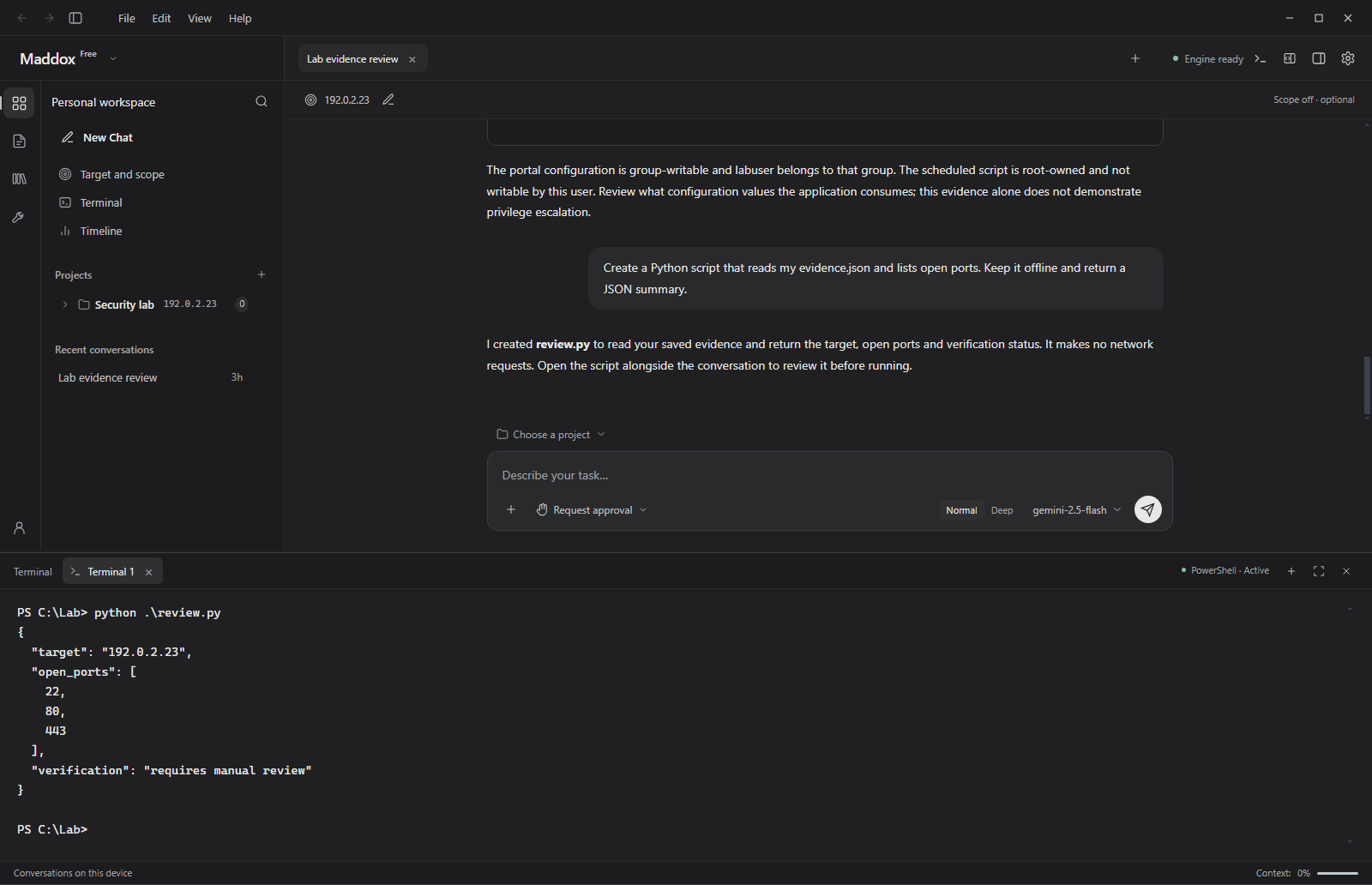
- On-Demand Shell Sessions: Launch PowerShell, Bash, or custom shell tabs with keyboard shortcuts (`Ctrl + ``).
- Direct Script Execution: Test freshly generated scripts and custom payloads against recorded data with immediate feedback.
- Independent Contracts: Manual terminal commands remain distinct from agent-governed operations, giving operators full freedom to run arbitrary diagnostic commands safely.
6. Target Database & Observations Inspector
With evidence, scan logs, and script outputs in place, the operator requests a consolidated assessment summary. Maddox aggregates the state in the dedicated collapsible right panel, which serves as the live state store for the engagement.
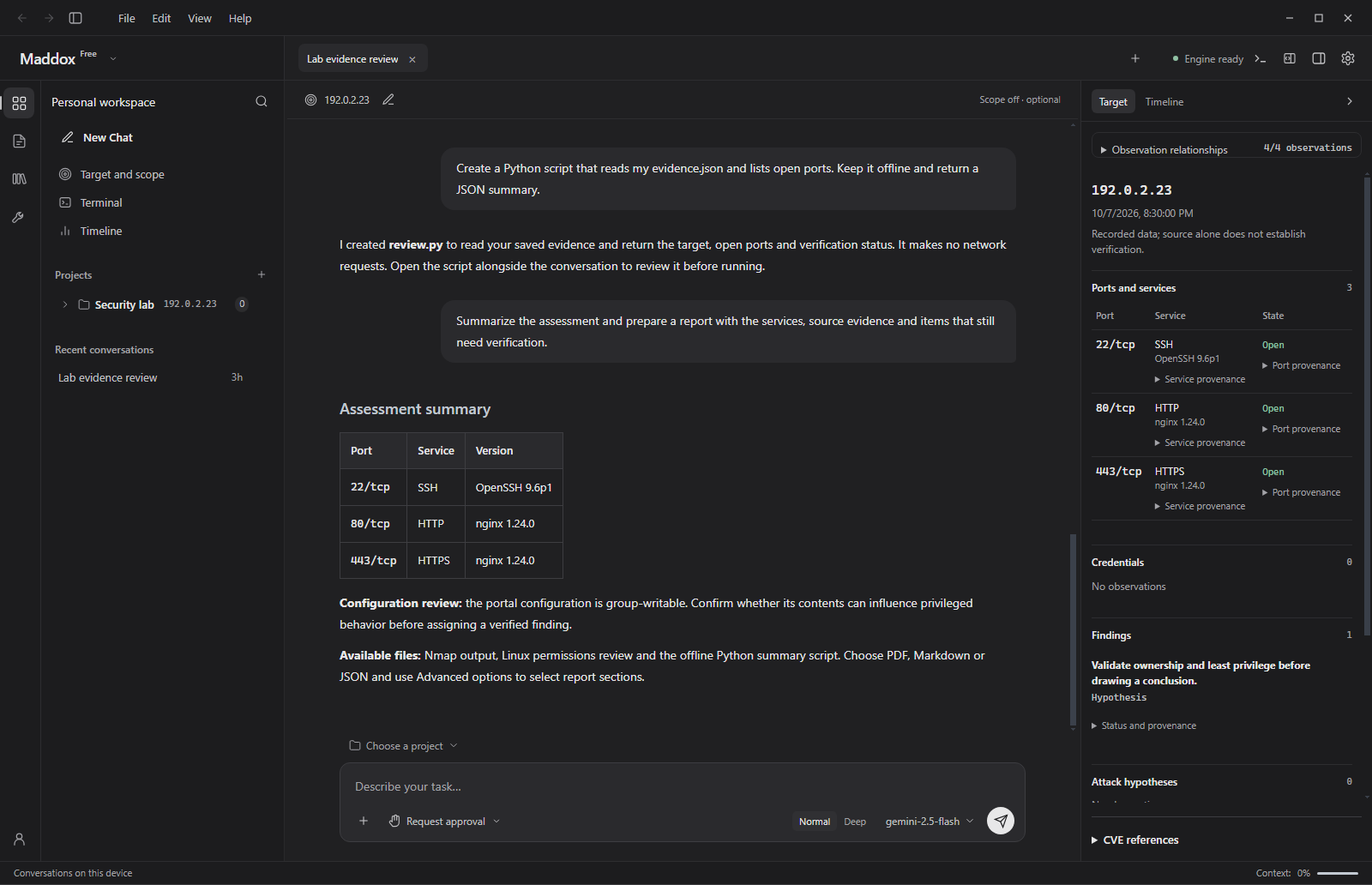
- Ports & Services Inventory: Displays active ports and service banners with provenance tracking, documenting precisely which scan or command discovered each service.
- Findings & Provenance: Discovered weaknesses and potential attack paths are documented with confidence levels, severity ratings, and observation timestamps.
- Cognitive Bias Protection: By explicitly distinguishing between Confirmed Findings and Working Hypotheses, Maddox helps penetration testers avoid tunnel vision during complex engagements.
7. Conversation Artifact Library
Every artifact generated throughout an assessment—including command transcripts, parsed summaries, and custom markdown notes—is systematically archived in the Maddox Library.
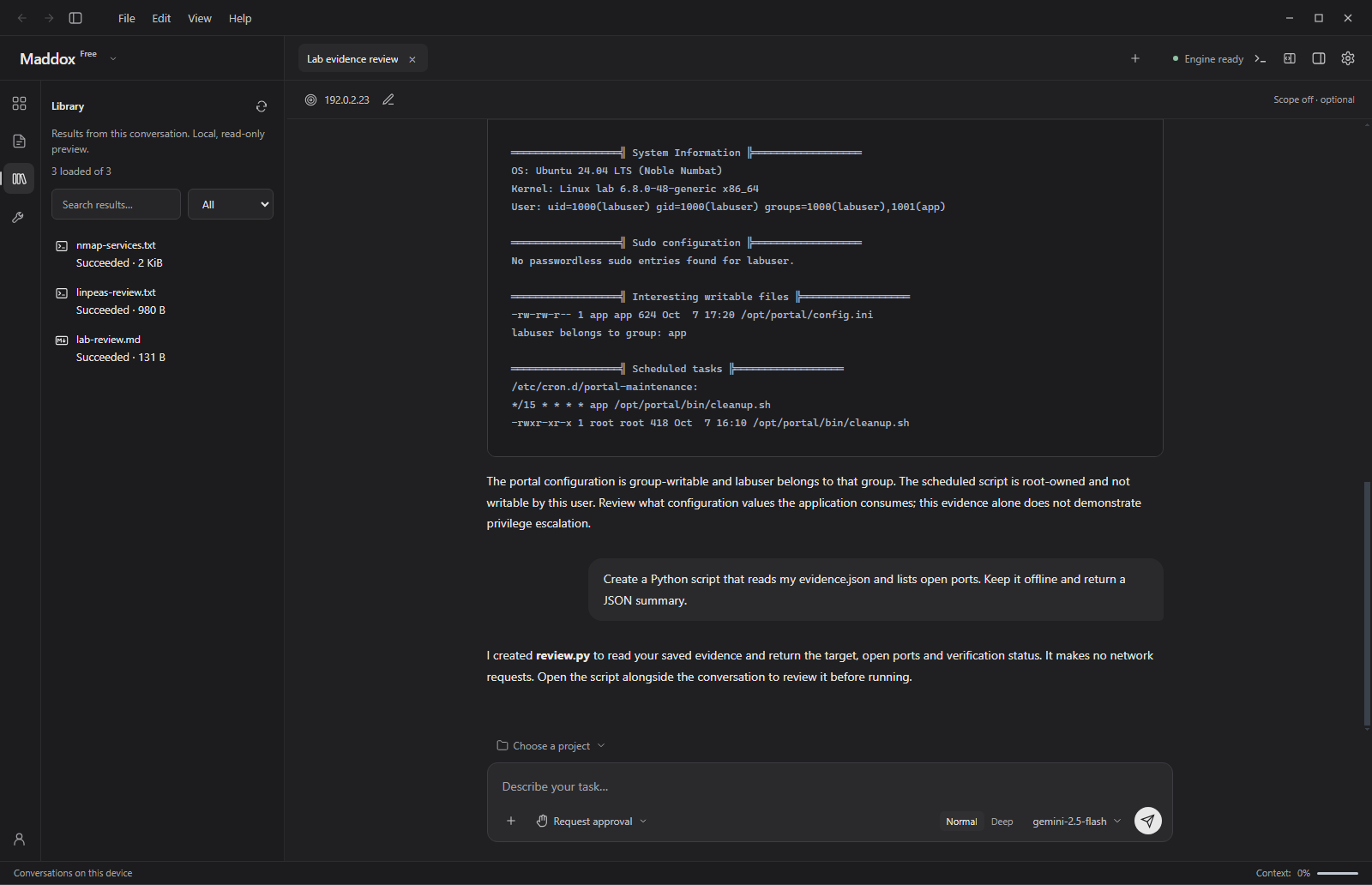
- Dedicated Archive: Scans (
nmap-services.txt), review logs (linpeas-review.txt), and generated documentation (lab-review.md) are tracked per conversation. - Local Read-Only Previews: Inspect generated files and command outputs instantly without cluttering the local file system or working repositories.
- Search & Filter: Quickly find historical execution logs and output data across multi-stage engagements.
8. Modular Assessment Reporting & Document Preview
Transforming technical findings into a clean, stakeholder-ready document is often the most time-consuming part of an assessment. Maddox automates report compilation from its canonical local database.
Report Configuration
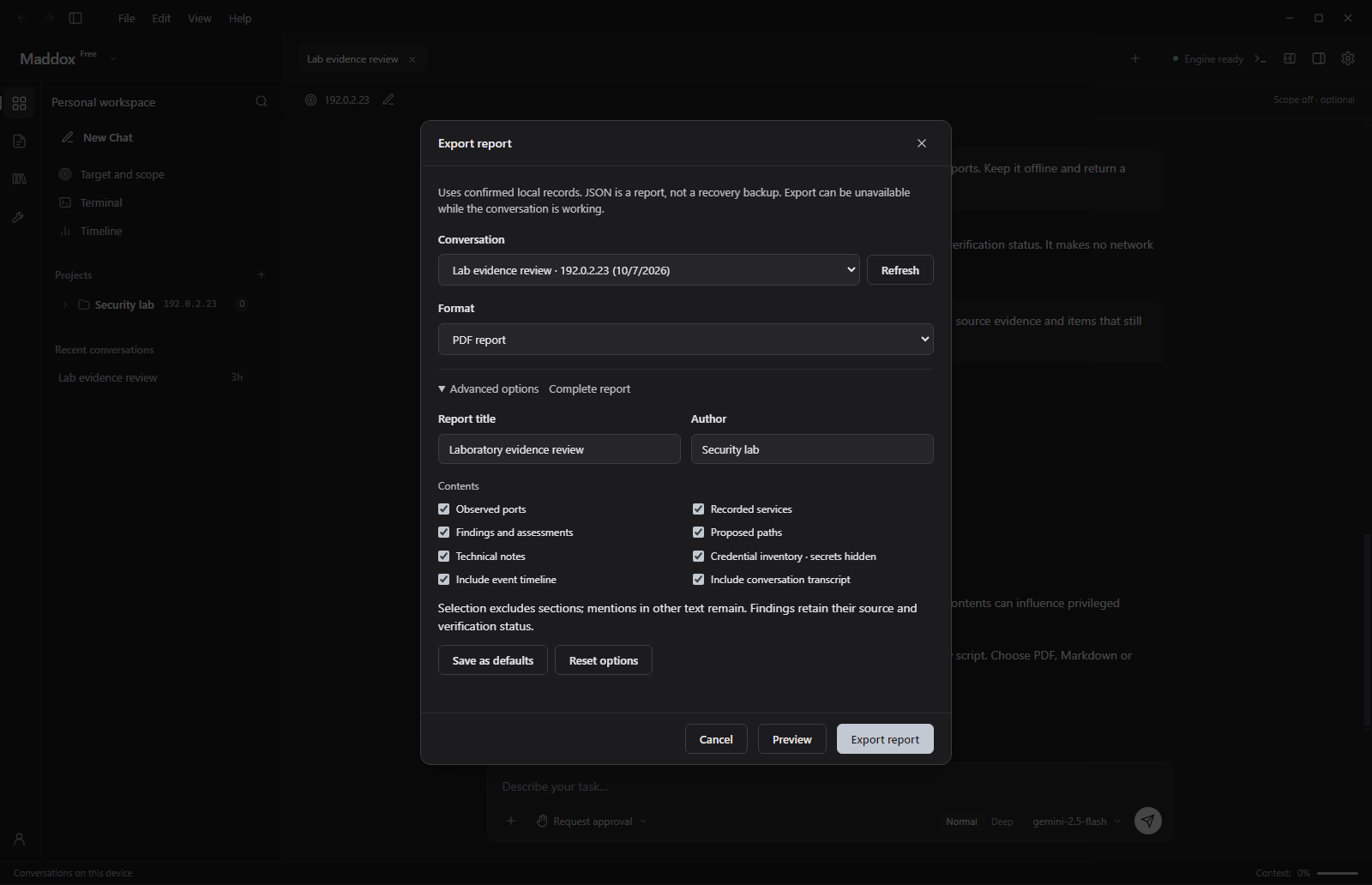
- Multiple Formats: Export reports as formatted PDF, Markdown, or sanitized JSON.
- Granular Section Selection: Customize the document with toggles for observed ports, recorded services, findings, proposed attack paths, technical notes, credential inventories (with sensitive secrets redacted), and chronological event timelines.
- Metadata Management: Set custom report titles, author names, and save preferred export templates as default.
Interactive Document Preview
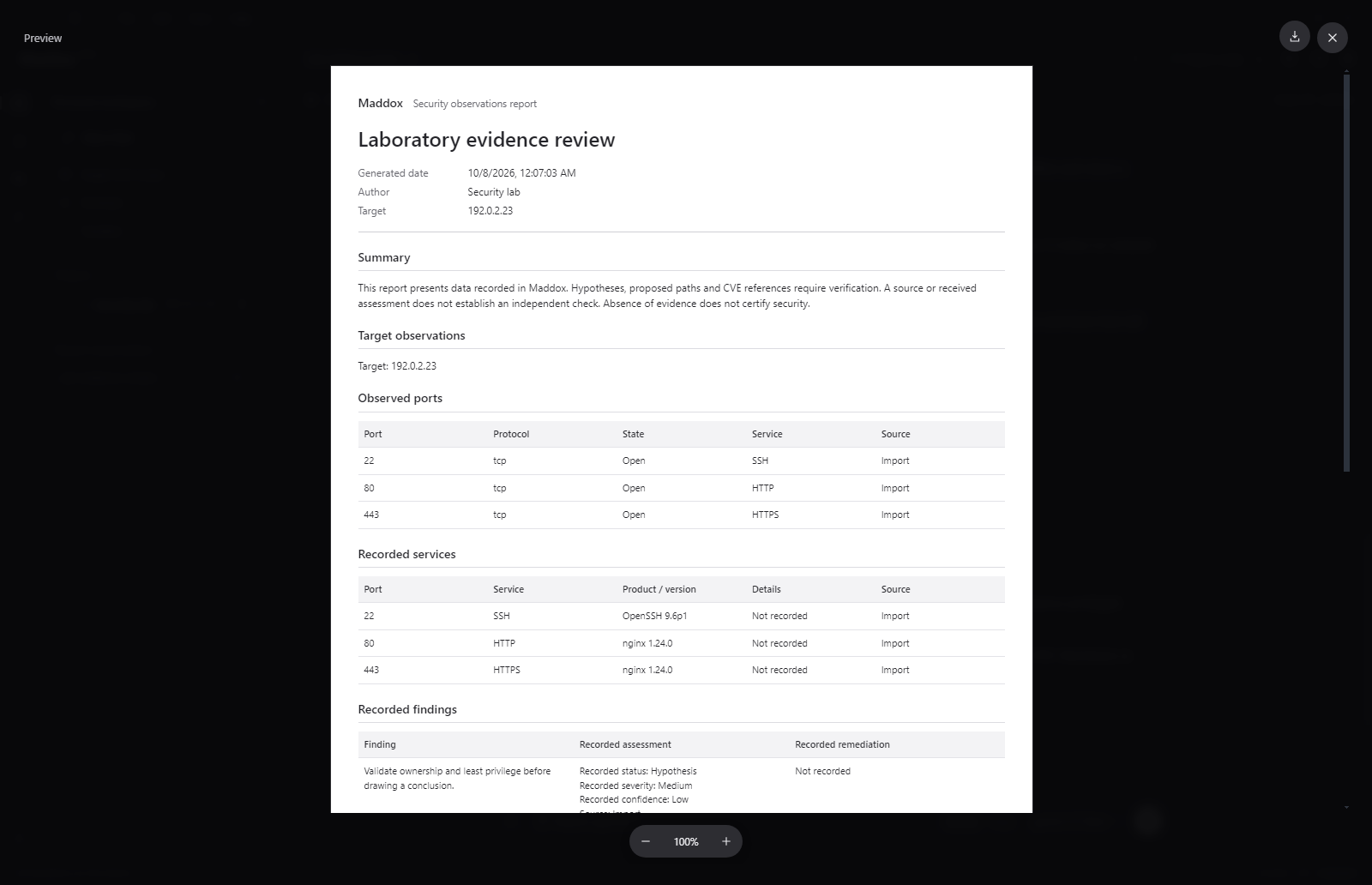
- Expanded Preview: Inspect the formatted document prior to export in an interactive reader view with zoom controls.
- Structured Sections: Reports automatically assemble executive summaries, target observations, port and service matrices, and detailed finding breakdowns with remediation guidance.
Technical Architecture & Privacy
Maddox is built with a focus on performance, stability, and strict local privacy:
- Decoupled Electron + Python Core: High-priority UI rendering and event loops in Electron are cleanly isolated from the heavy Python reasoning engine and tool adapters via an asynchronous JSON-Lines IPC protocol.
- Local-First SQLite Persistence: Conversations, target databases, timelines, and credentials are saved locally in SQLite databases. No audit data is stored in third-party clouds without operator consent.
- Context Guards & Data Redaction: Automatic redaction prevents accidental exposure of sensitive keys, tokens, or credentials when communicating with external LLM providers.
- Flexible Model Selection: Operators can configure standard and deep reasoning model slots (e.g., Gemini 2.5 Flash) to match speed and analytical depth to their workflow.